Here is the shell's true superpower, and it is not the commands. It's that every command talks. Every single one reads a stream called stdin and writes two streams called stdout (the good, intended output) and stderr (the complaints). When you realise streams can be rewired, twenty small commands become a billion big ones.
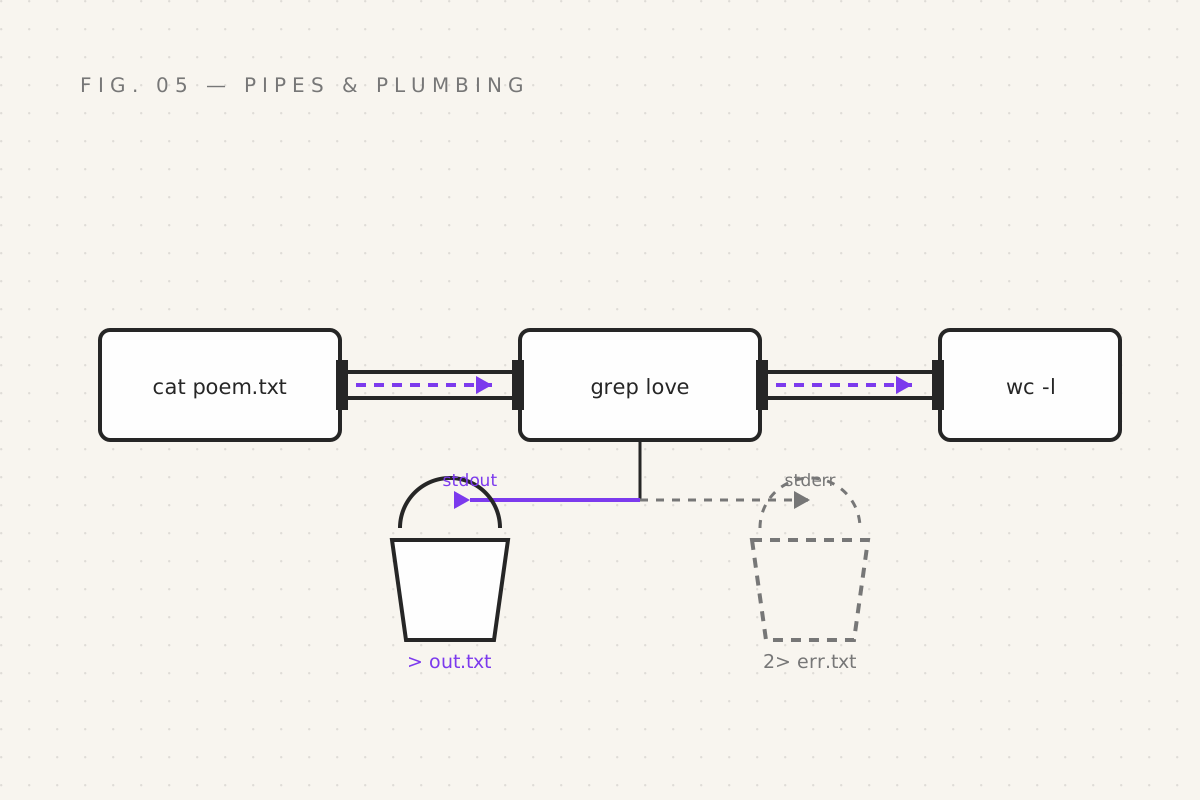
The pipe: |
The vertical bar takes one command's stdout and plugs it directly into the next command's stdin. A literal pipe. Meet the classic:
cat poem.txt | grep love | wc -lThree commands, one assembly line:
cat poem.txt— pours the whole file outgrep love— keeps only lines containing "love"wc -l— counts the lines that survived
Result: how many lines in this poem mention love. A romantic statistic, and a pipeline you'll use weekly in less poetic forms.
The chain is unbounded:
history | grep "sudo" | wc -l        # how many times you needed the admin powers
ls -lh | grep "Sep"                  # files touched this month (roughly; calendars lie)
grep -rn "TODO" . | wc -l            # your debt to the future, quantified
This is the Unix philosophy in one rune: do one thing well; compose. Each command is a LEGO brick. Pipes snap them together. No command needs to know another exists.
Rewiring the streams
Pipes move stdout. Redirection reroutes the streams entirely:
echo "spell notes" > grimoire.txt     # stdout → file (overwrites! with feeling!)
echo "page two" >> grimoire.txt       # stdout → file (appends, mercifully)
grep love poem.txt > love_lines.txt   # search results saved for later
wc -l < grimoire.txt                  # feed a FILE into stdin (arrow points in)
That first one deserves a warning label: > overwrites without asking.
Point it at the wrong file and the file's previous life is over. There is no
Ctrl+Z in the afterlife. >> appends; default to it until you're sure.
And now, stderr
Here's the twist that confuses everyone for exactly one afternoon: if you redirect a command that fails, the error still splatters on your screen.
cat ghost.txt > out.txt
# cat: ghost.txt: No such file or directory      ← still on screen!
That's because the error didn't travel through stdout — it went to stderr, the separate complaint channel, which by default points at your screen no matter what you did to stdout. stderr is the drunk friend at the party: you can steer the conversation (stdout) anywhere you like, but they will be heard.
Steer it anyway:
cat ghost.txt 2> err.txt        # 2 = stderr's channel number → into err.txt
cat ghost.txt > out.txt 2> err.txt   # civilized: output in one file, complaints in another
cat ghost.txt > all.txt 2>&1    # both streams merged into one file
2>&1 reads as "send stream 2 wherever stream 1 is going" and is
unforgettable once you've typed it wrong twice. Everyone does.
tee: the spy who sees and saves
tee sits in a pipe, lets everything flow past to the screen, and saves a
copy:
./build.sh | tee build.logYou watch the build live (because watching is half the fun) and a transcript
lands in build.log for the post-mortem. Also priceless when a 3 AM build
fails and you can't remember why, because at 3 AM you can't remember your own
name.
Exit codes: every command files a report
After every command, bash records whether it succeeded — a number called the
exit code, visible in $?:
grep love poem.txt
echo $?
# 0        ← success

grep love empty.txt
echo $?
# 1        ← failure (found nothing)
Yes: zero means success. Non-zero means something went wrong, with different numbers implying different failures. This backwards-looking convention is because a program has many ways to fail but only one way to succeed, and 1970s engineers were economising. You'll seethe, then adopt it.
Exit codes matter in scripts: if (part 07) literally asks "was that zero?"
before branching. The whole intelligence of bash decision-making is "did it
return zero or not" — and that, somehow, is enough to run the world's servers.
Your quest
- Build a file of favourite films;
cat films.txt | grep -i "the" | wc -l - Redirect a failure's stderr into a file, then open it and read the complaint with dignity
- Merge streams with
2>&1into one log file - Run anything with
| tee transcript.txtand watch yourself work - Check
$?after a success and a failure; accept zero-as-good into your heart
Next: part 06 — Labelled Boxes, where we teach
the shell to remember — variables, quoting, $PATH, and the special runes
$1, $?, $#.
Filed under Wizardy of Bash — part 05 of 15 · Previous: The Hunters · Next: Labelled Boxes